
Battlestar Wiki:Extensions
More actions
| |||||

Battlestar Wiki makes use of some custom-programmed extensions for its own purposes that are not part of the MediaWiki extension repository. They are listed below.
Extension: SourceSwitcher
The SourceSwitcher extension allows for in-line episode citations to show up in one of two ways, as defined by a preference in each user's preferences (see: Special:Preferences):
- Seen directly inline with article text:
Adama is the commander of the last battlestar, Galactica (TOS: "Saga of a Star World").
- Referenced as a footnote citation using the MediaWiki's citation system:
Adama is the commander of the last battlestar, Galactica [episodes 1].
These rely on JavaScript on the client-side ("user", i.e. you) and not server-side ("BattlestarWiki.org") in order to work. By default the "Inline" option is selected for all users, including those that are not logged in.
Changing Source Display Preferences
To make use of this feature, you must either log-in to your existing account or create an account.
Once logged-in:
- Go to Special:Preferences by clicking on the "user" symbol (the icon with a featureless head atop rounded shoulders) at the bottom of your browser.
- This will open a small pop-up menu. Click the line item that features a cog wheel with Preferences on it.

- On the Preference's menu, click on the "Appearance" tab.
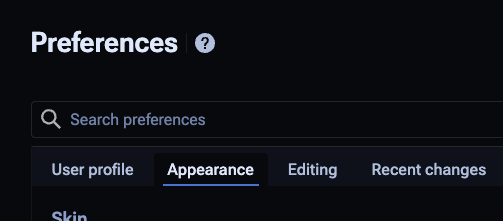
- Scroll down until you see the Source Display section, then choose one of the two options.

- Once you select your option, click Save.


Extension: FeedbackWidget

This particular extension allows for a floatable quote bubble button on the bottom right hand corner for submitting feedback. It will only work on the article namespace, where articles reside.
It is meant for quick reports for issues people may see, without needing to log in. It is designed to post a feedback note on the talk page of the article the end user is on, and uses CloudFlare's CAPTCHA to authenticate legitimate feedback to weed out spammers. Both anonymous and logged-in users are able to make use of this widget, with the understanding that their username or IP address will be visible as it will be used to identify the submitter of said feedback.
Use cases include those who have trepidation on editing Wikis in general, and allow for discussion on how best to address the concerns raised.
References
- ↑ (TOS: "Saga of a Star World")